Posts

Showing posts with the label APPLICATION

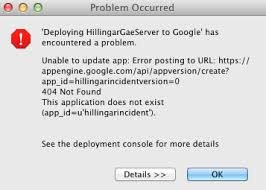
App engine ERROR SOLVED This application does not exist (app_id=??).
Image
This application does not exist (app_id=). You have to run 2 commands in order to initialise the blank application so  Run this 2 command gcloud config set project project-Id-here gcloud components update gcloud beta app create gcloud beta app create will be installed on your PC if you don't have it .Its 1 MB only You have to do exactly as the error message tells you, which is to run the  gcloud app create  (beta no longer needed) command from a terminal. App Engine is no longer automatically initialized for newly created projects, so you must run this command on a new project before deploying an App Engine app for the first time. __________________________________________________________________________ Also Suggested To check Final Running __________________________________________________________________________

Run Application on Real Device : Android Studio

Image
Hello all,                I am back with a new tutorial on Android Studio . Here Some of My Friends Having issue with running or deploying app directly on Real Device . There are Two reasons for that  1. ADB Drivers are not there 2. ADB Class Path Not set( type "adb devices" in cmd if not recognised then set path ) --------------------S olution --------------------------- Download ADB Driver Pack Here Click Here Then Follow the Steps In Windows 8 (8.1) or 10 64-bit you are unable to install unsigned drivers because the system enables driver signature enforcement by default. Select  Troubleshoot Advanced Options Select  Startup Options Restart Press 7 or F7 to choose Disable driver signature enforcement. Note: Temporarily, the setting will return to its original state after restarting. Install Android ADB Driver using an inf file (Manually) Windows encountered a problem installing the d...

SwiftKey's Neural Alpha keyboard uses its own brain to build better predictions

Image
The newest Android keyboard taps into neural network technology, which tries to work similarly to a human brain. SwiftKey wants to inject even better predictions into your smartphone’s keyboard. The company just launched the SwiftKey Neural Alpha for everyone to test out. The new keyboard comes with a pledge that it will create superbly accurate predictions and more quickly learn your word usage habits. The big idea behind the new keyboard is that it uses a type of machine learning called a neural network. In essence, the software tries to learn patterns and analyze language data similar to how a human brain works. SwiftKey says it will be noticeable in a number of everyday scenarios in comparison to its current keyboard, which uses a model called n-gram. Here’s one of several samples SwiftKey offers. You can check out more on  the SwiftKey blog . SWIFTKEY SwiftKey says its new neural network learning model will give you smarter word suggestions. If you want to try the ...

Apple Application Installing

Image
Online Method : Diawi Diawi  is a tool for iOS developers to deploy  Development  and  Ad hoc   iOS applications  or install them directly to the device. Here are the steps to follow to install apps through Diawi - 0. Open  Diawi.com  . 1.  Upload  the application and its provisioning profile. 2.  Send  the link to your testers, clients, friends or even use it yourself. (Either by Mail , WhatsApp etc) 3.  Open  the link in Safari on the iOS device and click on install. No need to bother with  iTunesConnect  for sharing your adhoc builds. Just upload your ipa file to http://diawi.com  and after successful uploading you will get a link open the link in safari and you will be asked to install app. Tap on install and enjoy Method # 2– iTools As we’ve mentioned earlier that iTools is probably  the best alternative to iTunes , and the tutorial to install apps on iPhone is very similar to the o...

Top 10 Best Websites to Find Jobs Online

Image
Finding a job is a big headache, isn’t it? But thanks to the today’s generations and its modernization that finding jobs has become so much easier now a day. Just imagine you can find a job while just sitting at home, you don’t have to go here and there in the hot summer or cold winter in the search of a job, and this is possible through few outstanding and amazing sites which have got lots of job offers for you. You don’t need to be worried about the complications that you may get to any site, as it is very easy and simple without any complications. Let’s have a look on few top and best sites for finding the best job for you.  1. LinkedIn   Of the greatest online community for the professionals, either to take over the job or to give away any jobs. LinkedIn has spread all over to world among millions of users. Just like its names it links the company or the firms with their selected representative. 2. Monster Monster is another top site which was laun...

Free voice calling feature lands on Facebook Messenger app in India

Image
Free voice calling feature lands on Facebook Messenger app in India Parth Makadiya On  March 20, 2014 Facebook has announced voice calling support for its Facebook Messenger app in India. This means that Facebook users in India will now be able make voice calls to anyone on their Facebook Messenger friends list. Voice calling feature is now available on both Android and iOS devices and users will find a ‘Free Call’ option in the chat window’s menu button on Android and ‘I’ button on iPhone. To initiate a voice call from the Facebook Messenger Android app, users will just need to select a friend, and choose the “Free Call” option by hitting the menu button. Users using the iOS app will need to select a friend from their contact list and then tap on the 3-dot menu overflow icon on the upper right corner which displays ‘Call’ option in order to make a voice call. An incoming call on Android devices will show up like a normal phone call with the caller’s f...