Posts

Showing posts with the label JAVA

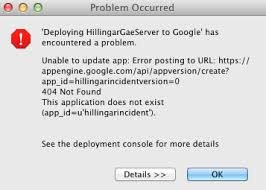
App engine ERROR SOLVED This application does not exist (app_id=??).
Image
This application does not exist (app_id=). You have to run 2 commands in order to initialise the blank application so  Run this 2 command gcloud config set project project-Id-here gcloud components update gcloud beta app create gcloud beta app create will be installed on your PC if you don't have it .Its 1 MB only You have to do exactly as the error message tells you, which is to run the  gcloud app create  (beta no longer needed) command from a terminal. App Engine is no longer automatically initialized for newly created projects, so you must run this command on a new project before deploying an App Engine app for the first time. __________________________________________________________________________ Also Suggested To check Final Running __________________________________________________________________________

HOW TO SET PATH AND CLASSPATH VARIABLE FOR JAVA IN Any Windows

Image
Hello Friends i am writing this post to help people like me who have started learning selenium and since in selenium RC and WebDriver we use java so setting classpath and path comes in to our way because we use Eclipse IDE for selenium automation script. So hope this post will help us all and if i am leaving anything then please write your view here as your comment 1-       Download  JDK 6 or 7 2-       Install JDK  and by Default Java installs at at this place   C:Program FilesJava 3-       Java folder  contain two folder of name  jdk1.6.0_20 and jre6 4-       Now we will set the classpath and path for java in our windows 7 machine 5-       Right Click on  My Computer 6-       Now click on  Advanced System Setting. ...

JAVA Practices of Ganpat University [solved programs]

Image
Hello all,                   This is batch of  2014 and We are uploading the solutions of Ganpat University Practicals.This will help you in Developing your JAVA skills . I will also add some important links so that you can download java and Setup on your Windows | Mac | Linux PC   .... JAVA Practicals    or   Link 2(Dropbox) Download JAVA--> NetBeans IDE FOR JAVA Java Works on cross platform means if you create a file on Mac OS and running on Windows OS .It will Definitely run ,But you need the File reader(class file reader) This JAVA Development kit Helps you to convert binary (class file ) into JAVA file .It also compile and run the file you have created .In C you have seen functions here You will see Class .Java is very secure. Java has better opportunity for good programmers .So Learn well.. Good Wishes From All Tricks & Team . For More Query Contact Me --> Parth Makadiya ...

Learn How to Code: 22 Free Online Resources

Image
MOST POPULAR 120 comments Is Buying a Sound Card Worth The Money? An Enthusiast's Perspective Silverstone Raven X Case Review: Flagship level cooling, priced for the masses 14 comments Western Digital converts Green hard drives to Blue in branding makeover T-Mobile 's next Un-carrier move could be free data for streaming video 16 comments Microsoft is making Windows 10 an automatic update next year 9 comments WB recommends 12GB RAM for Batman: Arkham Knight as some PC gamers report the game is STILL broken Twitch now caters to artists with dedicated Creative hub 8 comments Samsung SSD 950 Pro M.2 performance preview Parth Whether you’re looking for something new to learn, or just want to refresh your memory on something that might be a bit rusty, there are plenty of free sources online that you can take advantage of free code classes. According to the U.S. Bureau of Labor Statistics, ...

Fix Java was Started but Returned Exit Code=13 in Eclipse

Image
If you are  getting an  error saying “ Java was Started but Returned Exit Code=13 ” during Eclipse installation,  then here is fix for that.  Even I faced this problem during eclipse installation on my windows operating system. After searching on google I found that many of the users facing similar issue with Eclipse. If you are one of them, then here is the solution for the error. Reasons  for Java was Started but Returned Exit Code=13 Error: But before going to the solution, let us know why it is showing that error. If you know the problem behind this issue we can easily fix that error. Reason 1 :  The most common reason behind this problem is, we are  trying to install different bit  version -that is,  64 bit or 32 bit   version of the software. It maybe either Eclipse or Java. Reason 2 :  Configuration mistake in Eclipse.ini  file Reason 3 :  Special characters (  # , !, @) in Eclipse installati...